Aiarty Helps Bridge Camera Photographers Recover More Detail from Extreme-Zoom Photos
Aiarty Image Enhancer helps bridge camera photographers enhance detail, reduce noise, and upscale images for
Press Release Disclaimer: This is a press release distributed through the XPR Media network. It has not been independently verified by our newsroom.
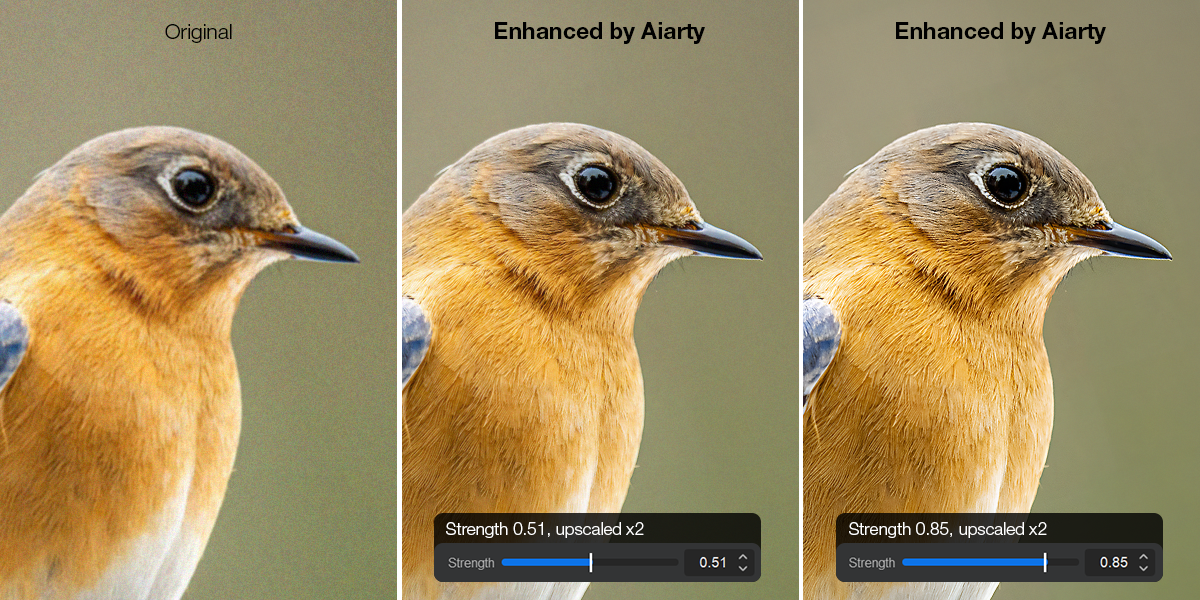

Aiarty Image Enhancer helps bridge camera photographers enhance detail, reduce noise, and upscale images for high-resolution sharing, display, and print.
CHENGDU, CHINA, August 20, 2026 /EINPresswire.com/ — Aiarty today highlighted how AI-powered image enhancement can complement the bridge camera photography workflow, helping photographers get more from long-range captures. The announcement comes as new-generation superzoom cameras continue to attract attention, with Sony’s recently introduced RX10 V combining a 24–600mm equivalent 25x optical zoom with a 20.1-megapixel 1.0-type sensor in an all-in-one body.
Long zoom lenses can bring distant subjects closer, but reach alone does not guarantee a large, detailed subject in the final image. Birds, wildlife, athletes, and performers may still occupy only a small portion of the frame, requiring heavy cropping. Shooting in low light or at higher ISO settings can introduce another challenge: visible grain and noise that obscure fine details.
Aiarty Image Enhancer provides a local AI post-processing workflow to help photographers address these challenges through detail recovery, noise reduction and upscaling, preparing images for sharing, display and print.
Upscale and Enhance Fine Details in Long-Range Photos
Even with a powerful zoom, a distant bird, animal or performer may occupy only a small portion of the frame. Cropping can improve composition and bring more attention to the subject, but it also reduces the amount of pixel information available for the final image. When enlarged, fine details may appear soft or less defined.
Aiarty Image Enhancer can help turn heavily cropped long-range shots into larger, more usable images for sharing, portfolios, displays and print. The same workflow can also be applied when an otherwise high-resolution image needs to be enlarged beyond its original resolution. The Windows version supports output up to 32K, while the Mac version supports up to 16K.
Reduce High-ISO Noise While Preserving Natural Texture
Dawn and dusk wildlife shoots, indoor sports, opera and live performances can require higher ISO settings, introducing grain and noise.
With Aiarty’s AI denoising, photographers can clean up noisy images while preserving recognizable textures such as feathers, fur and clothing. The goal is a clearer result without making the photograph look unnaturally smooth or processed.
Fine-Tune Color and Exposure Under Control After Enhancement
AI enhancement processes can occasionally lead to unexpected color shifts. To give photographers complete creative control, Aiarty features a built-in “Restore Color” function, alongside essential adjustments for Temperature, Exposure, and Saturation. This allows users to fine-tune the lighting and correct any color deviations immediately, finishing the image perfectly without having to switch to other editing tools.
Connect Aiarty with Lightroom for a More Seamless Workflow
For users already deeply integrated into the Adobe ecosystem, Aiarty now automatically configures itself as an External Editor in Lightroom upon launch. This seamless integration requires zero manual setup, allowing photographers to hand off images directly from Lightroom to Aiarty for deep enhancement.
Process More Images in One Workflow
A day of birding, wildlife photography, travel or an event can generate dozens or hundreds of images. Batch processing lets photographers enhance multiple files in one workflow, saving hours of tedious, manual editing time.
Work Locally with JPEG and RAW Files
Aiarty supports both JPG and RAW files, giving bridge camera photographers another option when working with high-ISO or detail-critical images. Rather than relying solely on the in-camera denoising and processed JPEG output, photographers can retain the original RAW file and perform noise reduction and detail enhancement in Aiarty. The RAW-based workflow preserves more original image information, helping reduce noise while retaining or recovering fine details with a more natural appearance.
For photographers concerned about privacy or the sluggish upload speeds in cloud-based workflow, Aiarty operates 100% locally.
Pricing & Availability
Aiarty Image Enhancer is available for both Windows and Mac.
To support bridge camera enthusiasts worldwide, Aiarty is offering an exclusive, limited-time discount on its flagship lifetime plan. A lifetime license is now 49% off. The price is reduced from $155 to just $79, saving $76. The license can be activated on up to three computers and includes free lifetime upgrades, so users can continue receiving future updates without paying additional upgrade fees.
To explore the software or claim the discount, please visit this page: https://www.aiarty.com/ai-image-enhancer/discount-coupon.htm?ttref=w4bd-aia-pm2608-enpr
About Aiarty
Aiarty is the AI-focused innovation brand from Digiarty Software, dedicated to developing cutting-edge multimedia solutions. With a talented team of passionate engineers dedicated to pushing boundaries, Aiarty develops cutting-edge AI tools meticulously crafted to elevate digital experiences worldwide.
About Digiarty Software
Digiarty Software, the developer of Aiarty, WinXDVD, and VideoProc, is a leading provider of multimedia software solutions for over 20 years. Renowned for their unwavering commitment to quality, performance, and customer satisfaction, Digiarty boasts a diverse software suite encompassing DVD backup, iPhone management, video transcoding, editing, and more. The comprehensive offering has garnered over 256 million software installations across 180 countries. To get more info about the company, please visit its official web page: https://www.aiarty.com/
Viola Nee
Digiarty Software Inc.
email us here
Visit us on social media:
LinkedIn
Instagram
Facebook
YouTube
TikTok
X
Legal Disclaimer:
EIN Presswire provides this news content “as is” without warranty of any kind. We do not accept any responsibility or liability
for the accuracy, content, images, videos, licenses, completeness, legality, or reliability of the information contained in this
article. If you have any complaints or copyright issues related to this article, kindly contact the author above.

Media gallery